VPC & Networking
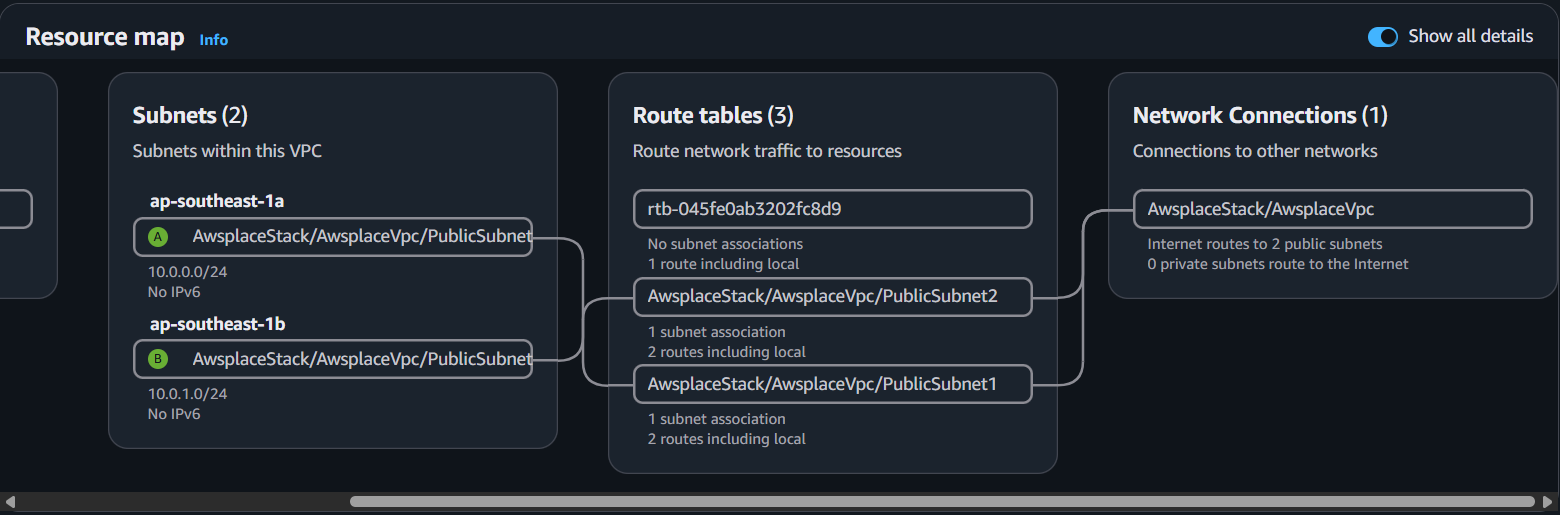
The VPC module (createVpc) is the simplest but most foundational module in the CDK codebase. Every other resource — ECS tasks, the ALB, EFS mount targets, Lambda (if it were in-VPC) — depends on the VPC existing first. It is always the first module called in the AwsplaceStack constructor.
Module overview
| Aspect | Detail |
|---|---|
| File | lib/vpc.ts |
| Function | createVpc(scope: Construct): VpcOutput |
| Resources | 1 VPC, 2 public subnets |
| Return type | { vpc: ec2.Vpc } |
1. VPC Definition
export function createVpc(scope: Construct): VpcOutput {
  const vpc = new ec2.Vpc(scope, 'AwsplaceVpc', {
    maxAzs: 2,
    natGateways: 0,
    subnetConfiguration: [
      {
        name: 'Public',
        subnetType: ec2.SubnetType.PUBLIC,
        cidrMask: 24,
      },
    ],
  });
  return { vpc };
}
Configuration breakdown
| Property | Value | Rationale |
|---|---|---|
| maxAzs | 2 | High availability across two Availability Zones in ap-southeast-1 |
| natGateways | 0 | No NAT Gateway needed — ECS tasks use public IPs, Lambda is outside the VPC |
| Subnet type | PUBLIC | ECS tasks need direct internet access to reach DynamoDB, S3, and ECR APIs |
| CIDR mask | /24 | 256 addresses per subnet, ample for Fargate task ENIs |
2. Why No NAT Gateway?
This is a deliberate architectural decision that saves approximately $32/month per NAT Gateway (~$64/month for 2-AZ high availability):
| Reason | Explanation |
|---|---|
| ECS tasks run in public subnets | Fargate tasks use assignPublicIp: true — they reach AWS APIs directly, no NAT needed |
| Lambda is NOT in a VPC | The Lambda reaches DynamoDB, S3, SQS, and the ECS ALB over public AWS API endpoints |
| Security at the SG level | Network isolation is enforced by security groups, not by private subnet placement |
The standard AWS best practice of placing compute in private subnets behind a NAT Gateway exists for defense-in-depth. The awsplace project achieves equivalent security through tightly scoped security groups (see below) while avoiding the operational cost and complexity of NAT Gateways.
3. Security Groups
Security groups are created in the modules that own the resources they protect — not in the VPC module itself. This keeps security rules co-located with the resource that needs them.
a) ALB Security Group (created in ecs.ts)
const albSg = new ec2.SecurityGroup(scope, 'AlbSecurityGroup', {
  vpc,
  description: 'ALB security group - allow HTTP/HTTPS from anywhere',
  allowAllOutbound: true,
});
albSg.addIngressRule(ec2.Peer.anyIpv4(), ec2.Port.tcp(80), 'Allow HTTP from anywhere');
albSg.addIngressRule(ec2.Peer.anyIpv4(), ec2.Port.tcp(443), 'Allow HTTPS from anywhere');
The ALB is internet-facing — it accepts traffic from any IPv4 address on ports 80 and 443. Port 80 exists only to redirect to 443 (HTTP → HTTPS permanent redirect).
b) ECS Security Group (created in ecs.ts)
const ecsSg = new ec2.SecurityGroup(scope, 'EcsSecurityGroup', {
  vpc,
  description: 'ECS security group - allow app port from ALB only',
  allowAllOutbound: true,
});
ecsSg.addIngressRule(albSg, ec2.Port.tcp(8980), 'Allow app traffic from ALB');
The ECS security group is locked down: it only accepts traffic on port 8980 from the ALB security group. Even though ECS tasks have public IP addresses, no direct internet traffic can reach them.
c) EFS Security Group (created in raftdb-application.ts)
raftDb.fileSystem.connections.allowDefaultPortFrom(
  ecsSg,
  'Allow the application task to mount durable raftdb storage',
);
This rule allows the ECS task to mount the EFS filesystem on the standard NFS port (2049). Only the ECS security group can reach the EFS mount targets.
Security group chain
Internet
  │
  ▼
ALB SG (ports 80, 443 from 0.0.0.0/0)
  │
  ▼
ECS SG (port 8980 from ALB SG only)
  │
  ├──► ECS Task: App container (:8980)
  │         │
  │         └──► localhost:9100 → RaftDB sidecar
  │
  └──► EFS SG (port 2049 from ECS SG only)
         │
         └──► EFS mount target → /data/raftdb
No direct path exists from the internet to the ECS task or the EFS filesystem — all traffic must pass through the ALB.
d) RaftDB Staging Security Group (created in raftdb-staging-stack.ts)
For the staging stack, security group configuration depends on node count:
| Node Count | SG Configuration | Access Pattern |
|---|---|---|
| 1 (single-node) | TCP 9100 from 0.0.0.0/0 | Direct client access for qualification tests |
| 3 (three-node) | TCP 9101 between members only | Internal Raft peer-to-peer only |
The single-node staging configuration intentionally opens port 9100 for qualification tooling. The three-node configuration is fully locked down for internal Raft peer communication.
4. VPC Output and Consumers
The createVpc function returns a single object:
interface VpcOutput {
  vpc: ec2.Vpc;
}
This vpc object is threaded through the stack constructor to every module that needs network placement:
| Consumer Module | How It Uses the VPC |
|---|---|
| createIamRoles | Does NOT use the VPC (IAM is global) |
| createDatabase | Does NOT use the VPC (DynamoDB is regional) |
| createEcr | Does NOT use the VPC (ECR is regional) |
| createStorage | Does NOT use the VPC (S3 is global) |
| createLambda | Does NOT use the VPC (Lambda is intentionally outside VPC) |
| createApiGateway | Does NOT use the VPC (API Gateway is edge-optimized) |
| createAmplify | Does NOT use the VPC (Amplify manages its own hosting) |
| createEcs | Uses VPC for: cluster, ALB, Fargate service subnet placement, security groups |
| createRaftDbApplicationStorage | Uses VPC for: EFS mount target placement |
| createRoute53AndCertificates | Does NOT use the VPC (DNS is global) |
Only two modules actually consume the VPC: ECS (for compute placement) and RaftDB Application Storage (for EFS mount targets). All other modules either operate at the regional/global level or are intentionally placed outside the VPC.