IAM Roles & Security
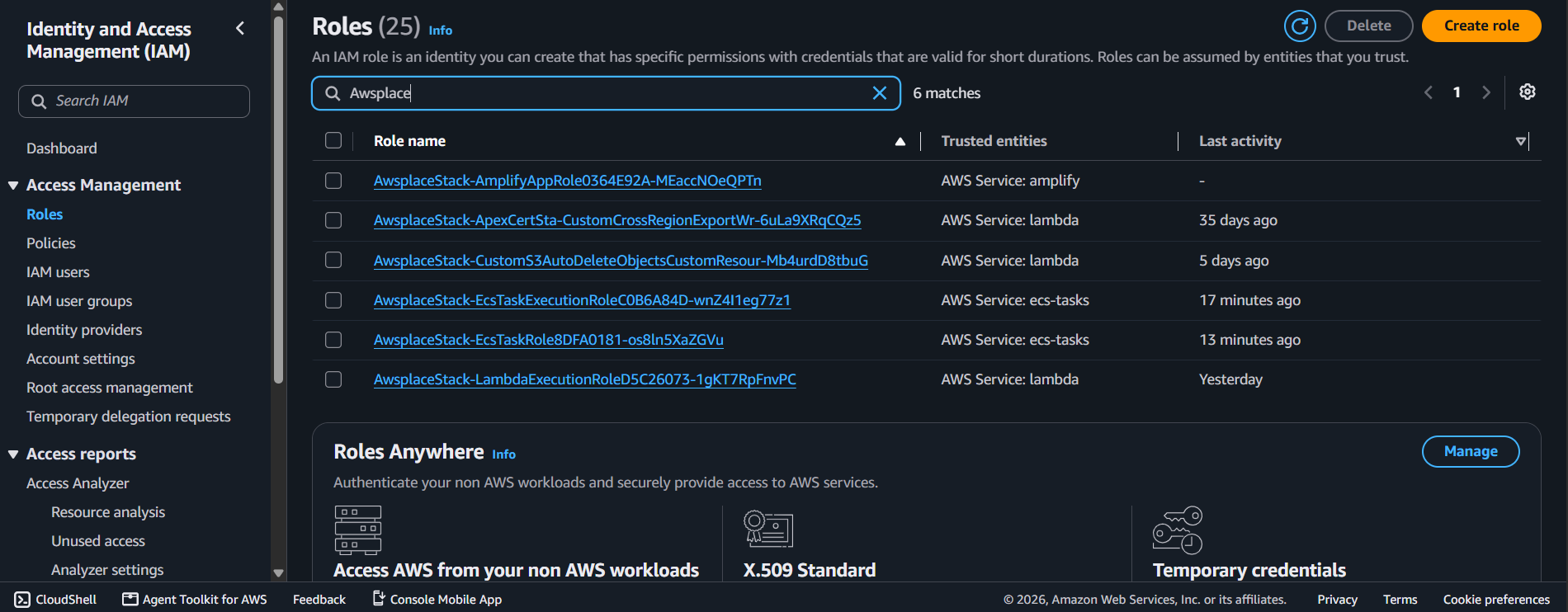
The IAM module (createIamRoles) creates 3 IAM roles following the principle of least privilege. Each role is scoped to the minimum permissions needed for its specific workload — no wildcard ** resources on sensitive actions, no over-provisioned policies.
Module overview
| Aspect | Detail |
|---|---|
| File | lib/iam.ts |
| Function | createIamRoles(scope: Construct, input: IamInput): IamOutput |
| Resources | 3 IAM roles with inline/managed policies |
| Return type | { ecsTaskExecutionRole, ecsTaskRole, lambdaExecutionRole } |
1. Role Summary
| Role | Assumed By | Used By | Key Permissions |
|---|---|---|---|
| ECS Task Execution | ecs-tasks.amazonaws.com | ECS agent (container startup) | ECR pull, CloudWatch Logs write, Secrets Manager read |
| ECS Task | ecs-tasks.amazonaws.com | Go application + RaftDB sidecar | DynamoDB CRUD (4 tables), S3 R/W (2 buckets), EFS mount |
| Lambda Execution | lambda.amazonaws.com | Lambda function | DynamoDB CRUD (4 tables), S3 PutObject (1 bucket), CloudWatch Logs |
export function createIamRoles(scope: Construct, input: IamInput): IamOutput {
  const { db, storage } = input;

  const ecsTaskExecutionRole = new iam.Role(scope, 'EcsTaskExecutionRole', {
    assumedBy: new iam.ServicePrincipal('ecs-tasks.amazonaws.com'),
  });

  const ecsTaskRole = new iam.Role(scope, 'EcsTaskRole', {
    assumedBy: new iam.ServicePrincipal('ecs-tasks.amazonaws.com'),
  });

  const lambdaExecutionRole = new iam.Role(scope, 'LambdaExecutionRole', {
    assumedBy: new iam.ServicePrincipal('lambda.amazonaws.com'),
  });

  // ... policy attachments ...

  return { ecsTaskExecutionRole, ecsTaskRole, lambdaExecutionRole };
}
2. Role 1: ECS Task Execution Role
This role is used by the ECS agent (not the application) to pull container images, write logs, and retrieve secrets at container startup.
Permissions
| Service | Actions | Resource Scope | Purpose |
|---|---|---|---|
| ECR | GetAuthorizationToken | ** (ECS-managed policy) | Authenticate to ECR |
| ECR | BatchCheckLayerAvailability, GetDownloadUrlForLayer, BatchGetImage | ** (ECS-managed policy) | Pull container image layers |
| CloudWatch Logs | CreateLogStream, PutLogEvents | ** (ECS-managed policy) | Write container stdout/stderr to CloudWatch |
| Secrets Manager | GetSecretValue | awsplace/app-secrets ARN only | Retrieve SESSION_SECRET for injection into App container |
Why three separate ECR permissions?
The ECS agent needs three distinct ECR permissions to pull an image:
- GetAuthorizationToken — obtain temporary Docker login credentials
- BatchCheckLayerAvailability — check which image layers already exist locally (avoids re-download)
- GetDownloadUrlForLayer + BatchGetImage — download missing layers and the image manifest
These are provided by the AWS-managed AmazonECSTaskExecutionRolePolicy. The Secrets Manager permission is the only custom addition — scoped to the single awsplace/app-secrets secret.
3. Role 2: ECS Task Role
This role is assumed by the Go application container (and the RaftDB sidecar) at runtime. It grants access to application data services.
Permissions
| Service | Actions | Resource Scope | Purpose |
|---|---|---|---|
| DynamoDB | GetItem, PutItem, UpdateItem, DeleteItem, Query, Scan, BatchGetItem, BatchWriteItem | All 4 table ARNs + index ARNs | Config, Bans, Milestones, History CRUD |
| S3 | GetObject, PutObject, DeleteObject | awsplace-canvas-{account}/, awsplace-exports-{account}/ | Canvas binary load/save, PNG export upload |
| S3 | ListBucket | awsplace-canvas-{account}, awsplace-exports-{account} | Bucket listing for export enumeration |
| EFS | ClientMount, ClientWrite | RaftDB filesystem ARN, conditioned on access point ARN | Mount EFS for RaftDB WAL |
a) DynamoDB resource scoping
function allTableArns(db: DatabaseOutput): string[] {
  const tables = [db.configTable, db.bansTable, db.milestonesTable, db.historyTable];
  return tables.flatMap((t) => [t.tableArn, `${t.tableArn}/index/*`]);
}

// Each table gets its own grant — CDK generates minimal, scoped policies
db.configTable.grantReadWriteData(ecsTaskRole);
db.bansTable.grantReadWriteData(ecsTaskRole);
db.milestonesTable.grantReadWriteData(ecsTaskRole);
db.historyTable.grantReadWriteData(ecsTaskRole);
Using grantReadWriteData() (rather than hand-writing policies) is important: CDK resolves the exact table ARN and index ARNs at synthesis time. If a table name changes, the policy updates automatically.
This prevents the application from accessing any DynamoDB table other than the four application tables — a misconfigured BACKEND env var pointing to a wrong table name would fail with an IAM error, not silently read/write the wrong data.
b) S3 resource scoping
storage.canvasBucket.grantReadWrite(ecsTaskRole);
storage.exportsBucket.grantReadWrite(ecsTaskRole);
Again using CDK grant methods — permissions are scoped to the exact bucket ARNs and their object paths. The task role cannot access any other S3 bucket in the account.
c) EFS condition key
ecsTaskRole.addToPrincipalPolicy(new iam.PolicyStatement({
  actions: ['elasticfilesystem:ClientMount', 'elasticfilesystem:ClientWrite'],
  resources: [raftDbFileSystem.fileSystemArn],
  conditions: {
    StringEquals: {
      'elasticfilesystem:AccessPointArn': raftDbAccessPoint.accessPointArn,
    },
  },
}));
The EFS permission is doubly scoped:
- Resource-level: Only the specific filesystem ARN
- Condition-level: Only when accessed through the specific access point ARN
This means even if the task role were somehow granted EFS access to another filesystem, the mount would fail unless the access point condition also matched.
4. Role 3: Lambda Execution Role
This role is assumed by the Lambda function for authentication and admin proxy operations.
Permissions
| Service | Actions | Resource Scope | Purpose |
|---|---|---|---|
| DynamoDB | Same CRUD as ECS task role | All 4 table ARNs + index ARNs | Direct DynamoDB access for auth/admin queries |
| S3 | PutObject | awsplace-exports-{account}/* only | Write PNG exports (read is not needed by Lambda) |
| CloudWatch Logs | CreateLogGroup, CreateLogStream, PutLogEvents | ** (managed policy) | Lambda logging via AWSLambdaBasicExecutionRole |
a) Lambda is NOT in a VPC
// Lambda does NOT receive vpcConfig — it runs outside the VPC
const apiFunction = new lambda.Function(scope, 'ApiFunction', {
  // ... no vpc or vpcSubnets property ...
});
The Lambda has **no ec2:DescribeNetworkInterfaces permission and no VPC attachment. It reaches DynamoDB and S3 over public AWS API endpoints. This is a deliberate design choice:
| In-VPC Lambda | Out-of-VPC Lambda |
|---|---|
| Cold start + ENI provisioning (~5-10s) | Cold start only (~500ms-2s) |
| Needs ec2:DescribeNetworkInterfaces, ec2:CreateNetworkInterface | No EC2 permissions |
| Can reach VPC-private resources (RDS, ElastiCache) | Can only reach public AWS APIs |
| Requires NAT Gateway for internet access | Direct internet access |
Since the Lambda only needs DynamoDB and S3 (both public AWS APIs), and it makes outbound calls to Discord’s OAuth API, the VPC would add cost and latency with no security benefit.
b) S3 write-only for exports
The Lambda only has PutObject on the exports bucket — no GetObject, no DeleteObject, no ListBucket. It writes PNG exports but never reads them. The admin dashboard reads exports directly from the S3 bucket (via the ECS task role or a pre-signed URL), not through the Lambda.
5. Security Architecture Diagram
┌────────────────────────────────────────────────────────────────────┐
│                             AWS Cloud                              │
│                                                                    │
│  ┌──────────────┐    ┌──────────────┐    ┌──────────────────────┐  │
│  │    Lambda    │    │     ALB      │    │     ECS Fargate      │  │
│  │   (no VPC)   │    │   (public)   │    │   (public subnet)    │  │
│  │              │    │              │    │                      │  │
│  │ Role:        │    │ SG:          │    │ Execution Role:      │  │
│  │ Lambda Exec  │    │ 0.0.0.0/0    │    │ - ECR pull           │  │
│  │              │    │ :80, :443    │    │ - CW Logs            │  │
│  │ Perms:       │    │              │    │ - Secrets Manager    │  │
│  │ - DDB CRUD   │    │              │    │                      │  │
│  │ - S3 Put     │    │              │    │ Task Role:           │  │
│  │ - CW Logs    │    │              │    │ - DDB CRUD (4 tbl)   │  │
│  │              │    │              │    │ - S3 R/W (2 bkt)     │  │
│  │              │    │              │    │ - EFS mount          │  │
│  └──────┬───────┘    └──────┬───────┘    └──────────┬───────────┘  │
│         │                   │                       │              │
│         ▼                   ▼                       ▼              │
│  ┌──────────────────────────────────────────────────────────────┐  │
│  │                   AWS Services (public APIs)                 │  │
│  │                                                              │  │
│  │    DynamoDB (4 tables)      S3 (2 buckets)     Secrets Mgr   │  │
│  │    ECR (1 repo)             EFS (1 fs)         CloudWatch    │  │
│  └──────────────────────────────────────────────────────────────┘  │
└────────────────────────────────────────────────────────────────────┘
Key security properties
| Property | Implementation | Verified By |
|---|---|---|
| ECS → DynamoDB | Scoped to 4 table ARNs + index ARNs | grantReadWriteData() per table |
| ECS → S3 | Scoped to 2 bucket ARNs | grantReadWrite() per bucket |
| ECS → EFS | Scoped to filesystem ARN + access point ARN condition | Condition key in policy |
| ECS → Secrets Manager | Scoped to single secret ARN (awsplace/app-secrets) | Explicit resource ARN |
| Lambda → DynamoDB | Scoped to 4 table ARNs + index ARNs | Same as ECS task role pattern |
| Lambda → S3 | Write-only (PutObject) to exports bucket only | No GetObject/ListBucket granted |
| No ** resources on write actions | All Put*, Delete*, Update* actions have explicit resource ARNs | Code review |
| JWT secret | Never in code; pulled from Secrets Manager at ECS startup | secrets field in container definition |
| No VPC for Lambda | No ENI cold start, no ec2:* permissions | Absence of vpc property |